HTML.6 Lable , Input 태그 및 속성
로그인화면, 소속 및 체크박스 텍스트 박스 등
Lable , input 태그
폼 요소
<label>
각 입력 양식의 레이블을 표시
★ 입력 양식의 클릭 가능 영역 확장
여기서 클릭 기능 영역 확장이란
왼쪽의 글씨를 클릭 시, 오른쪽 텍스트 입력 란이 활성화되는 것을 말한다.
또한 함께 활성화를 시키기 위해서는 레이블 태그에는 for 속성을/ 인풋 태그에는 id 속성으로 둘을 일치시켜줘야한다.

<input>
input은 기본적으로 어떤 input인지 정해주지 않으면 자동기능이 적용되지 않는다.
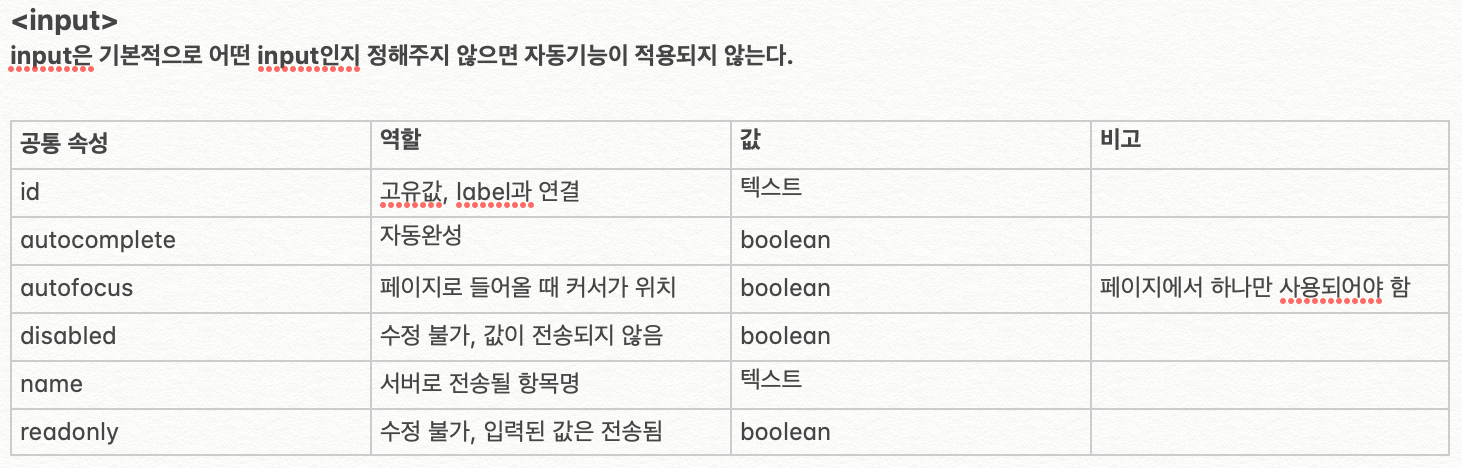
<input type="text"> : 일반 텍스트 입력
<input type="password"> : 패스워드 입력 (••• 등으로 표시)
<input type="tel"> : 전화번호 입력 (모바일 등에서 전화번포 키패드 표시)

<input type="number"> : 숫자값 입력

<input type="checkbox"> : 체크박스

<input type="radio"> : 라디오(택일)
라디오 적용시 하나의 name 으로 묶어주지 않으면 체크박스가 여러개 선택될 수 있다.
name은 하나의 그룹으로 생각하면 편하고, 하기 이미지는 동일한 name의 3가지 객체가 있는것이다.

<input type="file"> : 파일 첨부

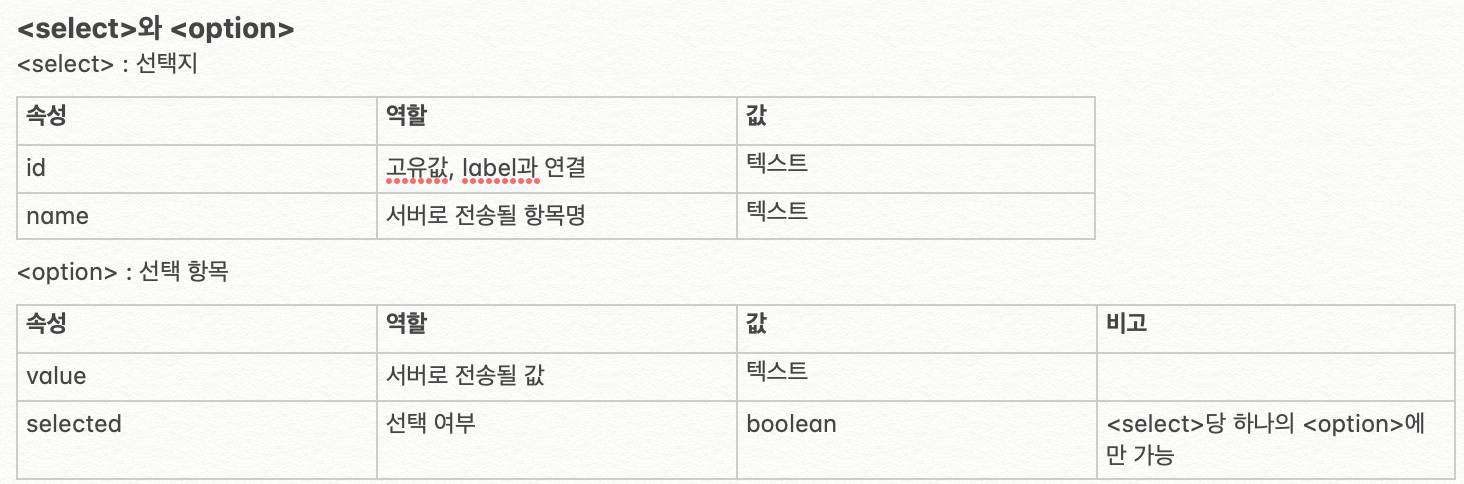
<select>와 <option>
<textarea>
여러 줄의 텍스트를 입력할 수 있는 태그

<button>

[주의] 제출용 버튼이 아닐 시 type을 'button'으로 지정할 것
버튼 태그 사용시 Form 태그를 사용하는것이 아닌!! Input 태그 안의 속성으로 사용하는 경우
습관적으로 type = button 속성을 부여하는것을 습관화 하자.
<style>

    form { line-height: 1.5em; margin: 36px 24px; }

    input, select { font-size: 0.9rem; }

    button { font-size: 1rem; }

    label { margin-right: 8px; vertical-align: top; }

  </style>

</head>

<body>

    <label for="ip-name">이름</label>

    <input id="ip-name" type="text" placeholder=" 니이름? 4글자까지만됨" maxlength="4">

    <br>

    <label for="ip-pw">비번</label>

    <input id="ip-pw" type="password" placeholder="비밀번호 8자리까지만" maxlength="8">

    <br>

    <br>

    <label for="ip-age">나이</label>

    <input id="ip-age" type="number">

    <br>

    <label for="ip-Ww">기혼</label>

    <input id="ip-Ww" type="checkbox" checked>

    <br>

    <label>역할</label>

        <input id="ip-dev" name="role" type="radio" checked>

        <label for="ip-dev">개발자</label>

        <input id="input-design" name="role" type="radio">

        <label for="input-design">디자이너</label>

        <input id="ip-pm" name="role" type="radio">

        <label for="ip-pm">매니저</label>

    <br>

   <label for="ip-file">첨부</label>

   <input id="ip-file" type="file" multiple>

   <br>

   <br>

   <label for="sel-dp">소속팀</label>

   <select id="sel-dp">


    <option value="adm">운영팀</option>

    <option value="mkt">마케팅팀</option>

    <option value="frt">프론트엔드팀</option>

    <option value="bck">백엔드팀</option>

    <option value="tst">테스트팀</option>

    <option value="mnt">유지보수팀</option>

   </select>

   <br>

   <br>

    <label for="text-1">소개</label>

    <textarea id="text-1" rows="5"></textarea>

    <br>

    <br>

    <button type="button">제출</button>


    <button type="button" disabled>취소</button>

</body>